WordCollapse1.1.1
Publisher Description
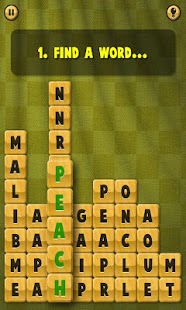
New and unique word puzzle!
WordCollapse is for you who love crosswords, sudoku, solitaire and trivia games. You will get started within seconds, the game is very easy and intuitive.
Available in English, Español, Italiano, Português, Français, Deutsch, Nederlands, Svenska, Norsk, Dansk and Suomi!
Each puzzle in WordCollapse contains a number of words on a certain theme, such as fruits, sports or animals. All letters are mixed and now you find a word and swipe it. The tiles disappear and the remaining tiles collapse into new words. The tricky bit is to remove the words in the correct order so you clear the board and complete the level.
The various themes in WordCollapse will test your knowledge - identifying words on a certain theme can be harder than you think. So get ready to put your brain into good use and download WordCollapse today!
This free app highlights
• 70 levels ranging from easy to very tricky divided into 4 different themes
• Great graphics and effects
• Intuitive and simple control
• Languages: English, Español, Italiano, Português, Français, Deutsch, Nederlands, Svenska, Norsk, Dansk, Suomi
About WordCollapse
The company that develops WordCollapse is Miniclip.com. The latest version released by its developer is 1.1.1. This app was rated by 1 users of our site and has an average rating of 3.0.
To install WordCollapse on your Android device, just click the green Continue To App button above to start the installation process. The app is listed on our website since 2013-08-28 and was downloaded 16 times. We have already checked if the download link is safe, however for your own protection we recommend that you scan the downloaded app with your antivirus. Your antivirus may detect the WordCollapse as malware as malware if the download link to com.miniclip.wordcollapse is broken.
How to install WordCollapse on your Android device:
- Click on the Continue To App button on our website. This will redirect you to Google Play.
- Once the WordCollapse is shown in the Google Play listing of your Android device, you can start its download and installation. Tap on the Install button located below the search bar and to the right of the app icon.
- A pop-up window with the permissions required by WordCollapse will be shown. Click on Accept to continue the process.
- WordCollapse will be downloaded onto your device, displaying a progress. Once the download completes, the installation will start and you'll get a notification after the installation is finished.
Program Details
System requirements
Download information
Pricing
Version History
version 1.1.1
posted on 2013-08-28
version 1.0.9
posted on 2013-05-10
Several fixes and updates
